

Looking for a quick and simple way to create QR codes without any hassle? You’ve come to the right place.
The easiest QR code generator can save you time and effort, letting you make professional-looking codes in just a few clicks. Imagine sharing your website, contact info, or special offers instantly—no tech skills needed. Keep reading to discover how you can create your own QR codes fast, easy, and free.
Your next big idea deserves to be shared effortlessly!
What Is A Qr Code?
A QR code is a type of barcode that stores information. It looks like a small square filled with black and white patterns. People scan QR codes using smartphone cameras or special apps. The code quickly links to websites, texts, or contact details.
Businesses and individuals use QR codes to share data fast and easily. They are common on posters, packaging, and menus. Scanning a QR code saves time by avoiding typing or searching.
How Does A Qr Code Work?
QR codes store data in a pattern of squares. Each pattern stands for a piece of information. When scanned, a device reads the pattern and translates it. The device then shows the stored information or opens a link.
Where Are Qr Codes Used?
QR codes appear in many places. Shops use them for payments and promotions. Restaurants add codes to menus for easy ordering. Event tickets and boarding passes often have QR codes for entry. They make sharing information simple and fast.
QR codes are easy to create and use. They speed up access to information. No need to type long URLs or details. They work with most smartphones. QR codes help businesses connect with customers quickly.

Credit: scanova.io
Benefits Of Using Qr Codes
QR codes have become a popular tool for sharing information quickly. They offer many benefits for businesses and individuals. Using QR codes makes it easier to connect people with websites, products, and services fast. This technology saves time and improves customer experience.
Creating QR codes is simple and does not require technical skills. They work well on print media, digital screens, and packaging. People can scan codes with their smartphones to get instant access to details. This convenience makes QR codes a valuable tool for marketing and communication.
Easy Access To Information
QR codes let users access information instantly. No need to type long URLs or search online. Just scan the code and get the details right away. This speed improves user satisfaction and keeps people engaged.
Cost-effective Marketing Tool
QR codes cost very little to create and use. They can be added to flyers, posters, and business cards. This low cost helps small businesses reach more customers without big expenses.
Track Customer Engagement
Many QR code generators offer tracking features. This lets businesses see how many people scan their codes. They learn which campaigns work best and adjust strategies accordingly.
Supports Contactless Interaction
QR codes enable contactless sharing of information. This is useful in places like restaurants and stores. Customers can view menus or product details without physical contact, promoting safety.
Versatile Use Across Industries
QR codes fit many industries and uses. From retail and events to education and healthcare. They link users to websites, videos, payment pages, and more. This versatility makes QR codes a practical choice everywhere.
Features Of Easiest Qr Code Generator
Easiest QR Code Generator offers a range of useful features. These features make QR code creation simple and fast. The tool suits both beginners and experienced users. Each feature helps create codes that fit different needs.
Explore the key features that make this generator stand out.
User-friendly Interface
The interface is clean and easy to use. No technical skills are needed to start. Buttons and options are clear and well-organized. Users can create QR codes in just a few clicks. The design helps avoid confusion and saves time.
Customizable Qr Designs
Users can change colors, shapes, and logos in QR codes. Custom designs make codes more attractive and unique. This feature helps match QR codes with brands or themes. It adds a personal touch to every creation.
Instant Qr Code Creation
QR codes generate instantly after entering data. There is no waiting time or delay. This quick process suits fast-paced projects and last-minute needs. Users get immediate results and can download codes right away.
Multiple Data Types Supported
The generator supports many data types like URLs, text, contacts, and Wi-Fi details. This variety allows users to create codes for different purposes. Each data type works smoothly and accurately. It offers flexibility for many uses.
Step-by-step Guide To Create Qr Codes
Creating a QR code is simple with the Easiest-QR-Code-Generator. This guide breaks the process into clear steps. Follow each one to make your own QR code fast and easy.
Choosing The Data Type
First, select the type of data for your QR code. Options include URL, text, phone number, email, or contact info. Choose the one that fits your need best. This step ensures your QR code works correctly.
Entering Information
Next, enter the information for the chosen data type. For example, type the website address or phone number. Double-check the details to avoid errors. Accurate info means the QR code leads users to the right place.
Customizing The Design
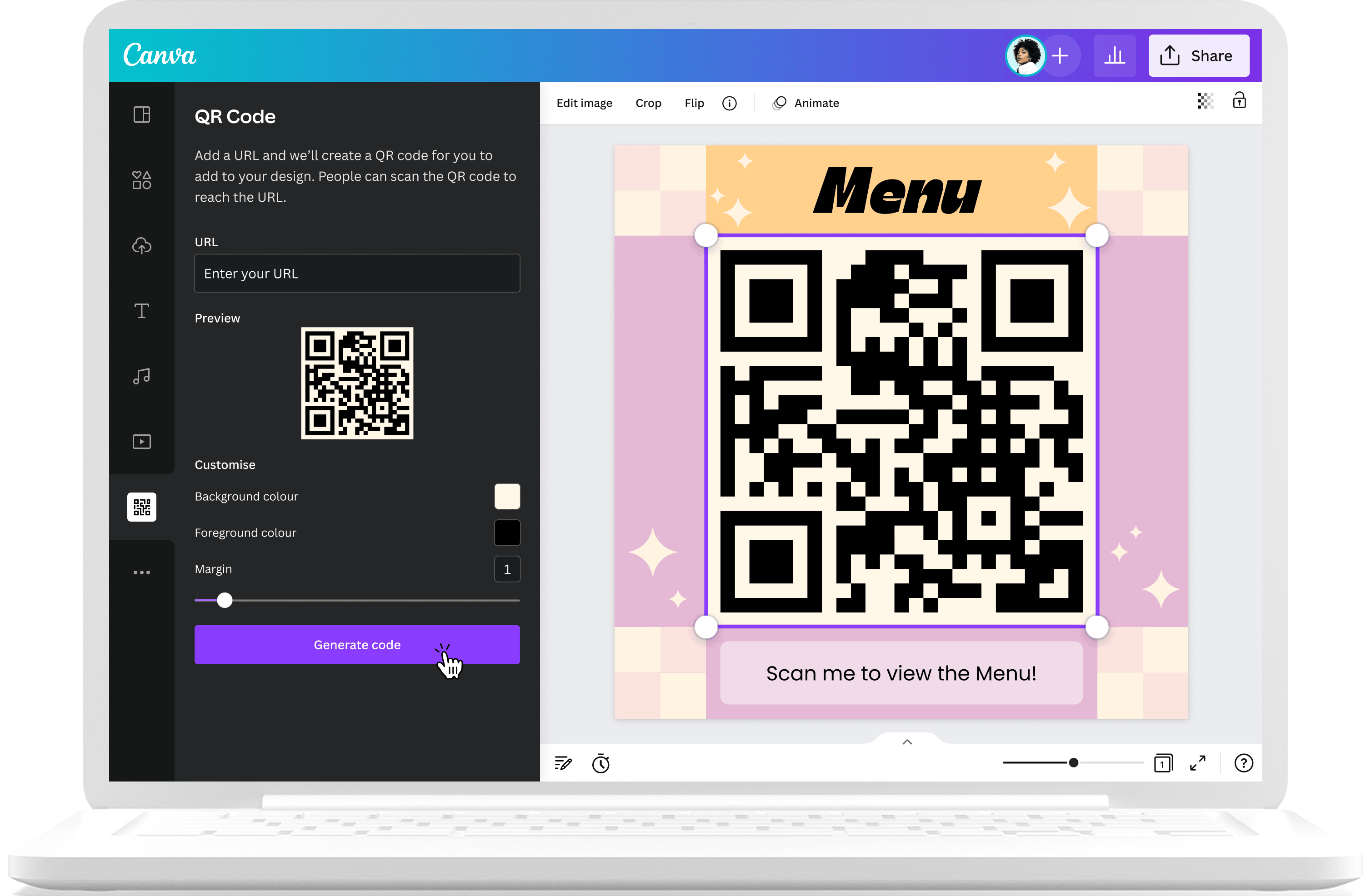
Now, customize the look of your QR code. Pick colors, shapes, and patterns that match your style. You can add a logo or change the background. This makes your QR code unique and more attractive.
Generating And Downloading
Finally, click the generate button to create your QR code. Preview it to confirm everything looks good. Download the file in your preferred format like PNG or SVG. Your QR code is ready to use anywhere.
Tips For Effective Qr Code Usage
Using QR codes effectively can boost user engagement and improve your marketing results. Simple changes make a big difference. Follow these tips to get the best from your QR codes.
Optimizing Qr Code Size
Make sure your QR code is large enough to scan easily. Small codes can be hard to read, especially on mobile devices. A size of at least 2 x 2 inches works well for most uses. Bigger is better for outdoor or distant viewing.
Placing Qr Codes Strategically
Put QR codes where people can see and reach them. Avoid placing codes on curved or shiny surfaces. High-traffic areas like store windows or product packaging work well. Always choose spots with good lighting for easy scanning.
Testing Qr Code Scanning
Check your QR code before sharing it widely. Scan with different devices and apps to ensure it works. Fix any errors that stop the code from opening the right link. Test both print and digital versions for best results.
Credit: www.canva.com
Common Qr Code Applications
QR codes are everywhere today. They make sharing information fast and easy. Many businesses and individuals use QR codes for different tasks. These codes save time and reduce errors. Here are some common uses of QR codes in daily life and business.
Marketing And Promotions
Businesses use QR codes to share offers and discounts. Customers scan the code to get deals quickly. QR codes link to websites, videos, or product details. This helps companies reach more people easily. It also tracks how many people see the ads.
Event Management
Events use QR codes for tickets and check-ins. Guests show the code on their phones to enter. It speeds up the registration process. Organizers can control access and collect data. QR codes also share event schedules and updates.
Contact Sharing
QR codes make sharing contacts simple. Scan the code to save phone numbers or emails. It avoids typing mistakes and saves time. Many use QR codes on business cards or websites. This helps build connections fast and easy.
Payment Solutions
People use QR codes to pay quickly and safely. The code links directly to payment apps or accounts. No need to carry cash or cards. Businesses accept payments with just a scan. It is fast, secure, and convenient for all.
Troubleshooting Qr Code Issues
QR codes make sharing information quick and easy. But sometimes, they don’t work as expected. Troubleshooting QR code issues helps fix problems fast. It ensures smooth scanning and accurate data sharing. Let’s explore common problems and how to solve them.
Fixing Scan Errors
Scan errors happen when devices cannot read the code. Check the QR code size first. Too small codes are hard to scan. Make sure the code is clear and not blurry. Avoid placing codes on curved or uneven surfaces. Test the code with different scanners to spot issues.
Improving Qr Code Visibility
Visibility affects how well scanners read QR codes. Use high contrast colors between the code and background. Black code on white background works best. Avoid light colors that blend together. Keep enough white space around the code. This space helps scanners focus on the code.
Ensuring Data Accuracy
Data errors can cause wrong or missing information. Double-check the data before generating the QR code. Use simple and correct text or URLs. Avoid extra spaces or special characters. Test the code after creation to confirm it directs correctly.

Credit: www.the-qrcode-generator.com
Comparing Qr Code Generators
Choosing the right QR code generator can save time and effort. Many tools exist, but they vary in features and ease of use. Comparing these tools helps find the best fit for your needs. Focus on speed, customization, and compatibility to make a smart choice.
Speed And Ease Of Use
Fast generation matters for quick results. The easiest QR code generators create codes instantly. Clear interfaces help beginners create codes without confusion. Simple steps reduce errors and speed up the process. No need for complex instructions or extra software.
Customization Options
Custom QR codes stand out and match your brand. Basic generators offer limited design choices. Better tools allow colors, logos, and shapes changes. Adjusting size and error correction improves scanning. Custom features add a personal touch to each code.
Compatibility And Export Formats
QR codes must work on many devices. Good generators support all standard QR code types. Export options like PNG, SVG, or PDF give flexibility. High-quality files ensure clear printing and sharing. Easy download and use matter for smooth workflows.
Frequently Asked Questions
What Is The Easiest Qr Code Generator To Use?
The easiest QR code generator offers a simple interface and quick creation process. It requires no technical skills and supports multiple data types like URLs, text, and contacts.
How Can I Create A Qr Code For Free?
Many online tools allow free QR code generation. Just enter your data, customize the design if needed, and download the code instantly without any cost.
Can I Customize Qr Codes With Colors And Logos?
Yes, most easy QR code generators let you change colors and add logos. This helps brand your QR code while keeping it scannable and professional.
Are Qr Codes Generated By Easy Tools Safe To Use?
Yes, QR codes created by trusted generators are safe. They contain encoded data and do not carry viruses or malware themselves.
Conclusion
Creating QR codes has never been easier or faster. This tool saves time and effort for everyone. You can generate codes for websites, contacts, or events in seconds. No special skills are needed, just a few clicks. Using this generator helps share information simply and clearly.
Try it today and see how simple it is. Your projects will look neat and professional. Everyone can benefit from this easy solution. Give it a go and enjoy quick results.